Wastime
A quiet deck of questions you can sit with
Short prompts about time, meaning, habits, and life for journaling, thinking, or talking it out.
Reflection is the whole reason Wastime Questions exists. It won't try to fix you or talk you into being more productive. A question simply gives you room to notice what actually matters to you and what you keep postponing.
There are more than 600 questions spread across the app, enough to keep coming back to for a long while.
- Swipe through prompt decks like cards
- Copy any question in one tap
- Save favorites worth returning to
- Use prompts in journaling or in any AI chat you prefer


Why questions belong next to tracking
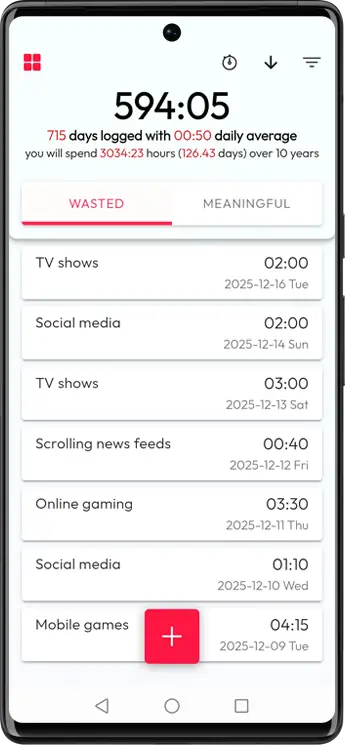
Tracking and calculators are good at surfacing patterns, though what a pattern actually means for your life is something only you can work out.
- A chart can tell you exactly where the hours went and still leave you with no idea what to do differently on Monday.
- You can track wasted time and calculate the time you have left, and go years without ever asking the harder question underneath.
- Questions are the quiet pause in all of that, where nothing is being measured and you're simply trying to see clearly.
A small pause for clarity
The whole thing stays deliberately small, so that one prompt and one honest answer are enough to leave you a little clearer about what comes next.
There's nothing here to complete. One good question can stay with you for weeks, and that's usually a sign it was the right one.
How it works, and why it stays simple
Browse a deck, keep what you want to sit with, and answer it however you like whenever you come back.
Browse decks
Swipe through prompts like a deck of cards and pick what resonates right now.
Copy any question
Tap once to copy text and answer in notes, a journal, or another app.
Save favorites
Use the heart icon to keep questions you want to revisit later.
Answer in your format
Write a paragraph, jot down bullets, draw a map, or just talk it into a voice note.
No pressure
Nothing here counts days or keeps score, and no answer is the correct one.
Use prompts with AI if you want
If reflecting out loud helps, you can send any prompt straight into ChatGPT or whatever chat you already use.
- Choose which chat app or link opens when you tap the prompt button.
- Wastime copies the question to your clipboard and opens your selected chat.
- Leave the setting empty to use the default ChatGPT link.
- AI stays entirely optional, since the questions work just as well as plain text you answer in a journal.
Written for a notebook first
The questions were written to be answered in your own words first, and they lose nothing if an AI chat never enters the picture.
Keep whatever style already works for you, whether that means long-form journaling or a few bullets scribbled before bed.
Main decks in the app
Core decks for deep themes and context decks connected to app modules.
Core decks
About Life
Values, choices, and real trade-offs.
About Death
Mortality, legacy, and regret for perspective when you want it.
About Yourself
Identity, fears, boundaries, and honesty.
About Meanings
Ethics, truth, beauty, and free will.
About Time
How you treat time, what you protect, and what you sacrifice.
Context decks
Life Calendar
Questions about seasons of life, motivation, and commitment.
Meaningful Topics
Prompts to define what meaningful actually means for you.
Wasted Topics
Prompts to spot patterns, triggers, and exits from time sinks.
Leftover Calculator
Questions about closeness, presence, and frequency with loved ones.
Wasted Calculator
Questions about habits, what they cost, and where you might cut back.
Basic / 24h / Planning
Questions that help turn calculations into decisions.
A weekly practice in 7 steps
- 1
Pick what resonates
The question that creates interest or resistance is usually worth answering.
- 2
Set a container
Two, ten, or twenty minutes is enough.
- 3
Write the first honest draft
Don't edit. If you need a way in, start from “What I don't want to admit is...”
- 4
Make it concrete
Use examples from the last week or month.
- 5
Look from two angles
Once from the inside, where your needs and fears sit, and then from the outside, where the facts and other people are.
- 6
Choose one tiny next step
Run a 24-hour or 7-day experiment you can actually test.
- 7
Repeat weekly
Keep it up for a month and the patterns start showing themselves without much effort.
When you're stuck, use a technique
3 bullets
(1) the truth, (2) the fear, (3) one small step.
5 Whys
Ask “why?” until you reach the real motive.
Trade-off check
Compare what you gain and lose by keeping things as they are.
Draw it
Use a mind map or timeline when words aren't enough.
Reality check
Compare your story with data from calendar, screen time, or notes.
Private by default
Reflection is a private thing, so nothing you mark here leaves the device.
- Works fully offline by default
- Favorites stay on your device
- Sync is optional and only used if you enable it
One question is enough
You don't need to answer everything. Pick one prompt that feels alive and stay with it.
Clarity tends to arrive slowly, once reflection turns into a rhythm you actually keep.
FAQ
Short answers before your first one.
Start with one question
Open Questions, pick one prompt, and write one answer you can stand behind.