 Wastime
Open, change or delete a calculation
A saved calculation is seldom the last word. Once you know a little more, the estimate can be opened and set right without starting over, and a number that no longer matters to you can simply go.
Before you start
You need a saved calculation, and every guide in this section that ends with Save leaves one behind. See what a routine adds up to saves the Evening series that is changed here.
Steps
Find a saved calculation
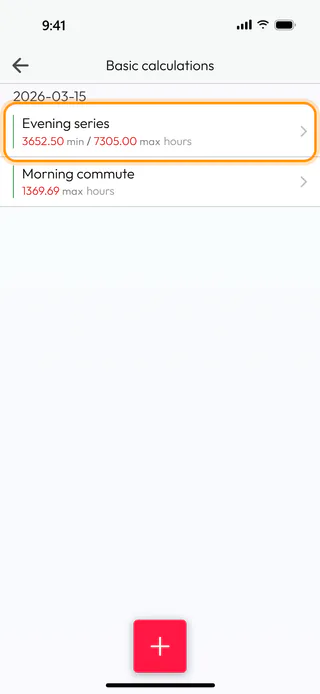
On the home screen, tap Calculators, then the calculator the calculation belongs to, here Basic. Each calculator keeps a list of its own, so a Basic calculation is found only in Basic calculations. The list is grouped by the day each calculation was last saved, and under 2026-03-15 Evening series reads 3652.50 min / 7305.00 max hours. Tap it to open it.
Change it
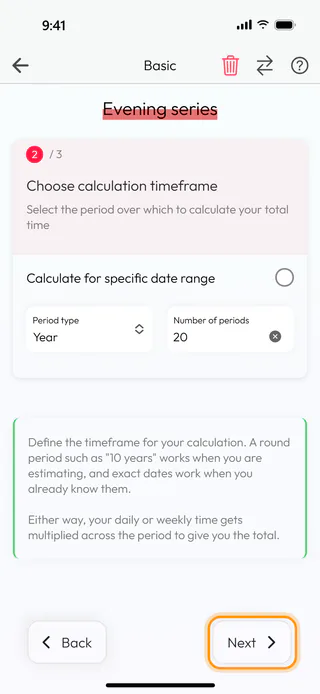
The calculation opens on its first step with everything you entered before, and the bin in the header is the sign that it is a saved one. Tap Next, and on the second step change Number of periods from 10 to 20 to run the series across twenty years instead of ten. Tap Next.
Save the change
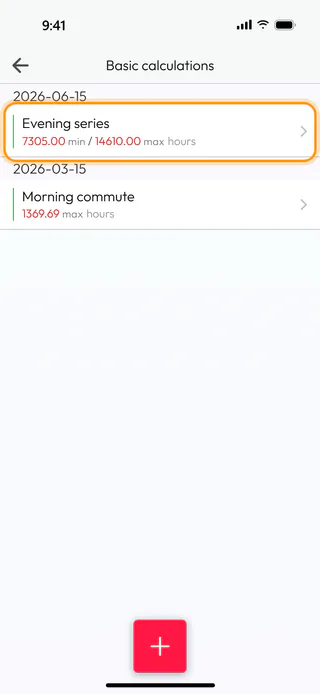
The last step shows the new total, 14610.00 hours at most, 7305.00 at least and 10957.50 on average. Tap Save at the bottom, and the Name window comes up with Evening series in it, so Save there keeps the change under the same name. A change you walk away from without Save is not kept, and the app does not ask about it. Back in Basic calculations, Evening series has moved up under today's date, 2026-06-15, with 7305.00 min / 14610.00 max hours.
Delete a calculation
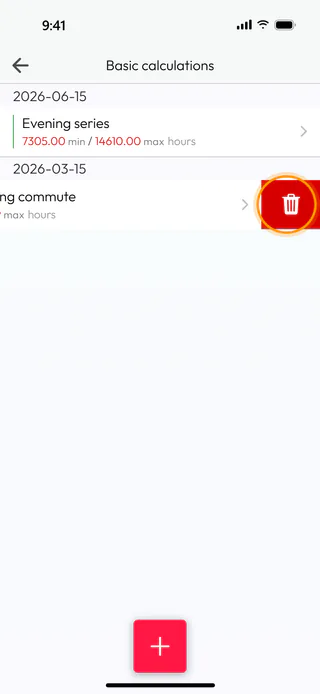
Swipe Morning commute to the left, and a red bin appears at the end of its row. Tap it and answer Yes to "Are you sure?", and the app says "Calculation deleted successfully" as the row leaves the list. An open calculation goes the same way with the bin in its header. There is no undo for it, so a calculation you might still want is better changed than deleted.
What's next
When a change is bigger than a number or two, it can be quicker to start again with the round + button, the way See what a routine adds up to does it. Each calculator saves the same way, and Count the time left with someone shows the name window that every new calculation starts with. A saved Leftover count also ages day by day, and Bring a Leftover count up to date counts it again from today.

