 Wastime
Work out what a goal asks of you
Plans are usually made without the arithmetic, and it tends to turn up later, when moving anything has already become hard. Planning does the sums at the start, so before the first hour goes in you know what a goal with a date on it asks of an ordinary week.
Before you start
Nothing has to be in place first. Planning opens with the same name window as Leftover, and Count the time left with someone shows how it works.
Steps
Choose what to work out
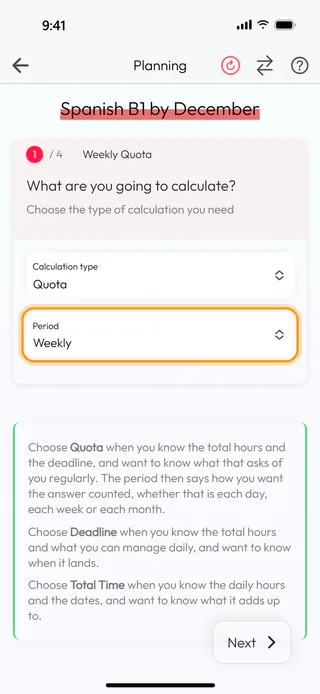
On the home screen, tap Calculators, then Planning, and start a new calculation with the round + button at the bottom of Planning calculations, naming it Spanish B1 by December or after a goal of your own. The first of four steps asks what you want to work out. Tap Calculation type and choose Quota, the one for when you know how many hours a goal takes and the date it is due. A Period field appears under it, and Weekly there gives the answer per week, while Daily and Monthly count it by the day or by the month. Deadline works the other way round and finds the date from the hours and a daily pace, as Find out when a goal will be done shows, and Total Time adds up a daily pace between two dates, as Count the hours a daily pace gives a goal shows. Tap Next.
Set the dates
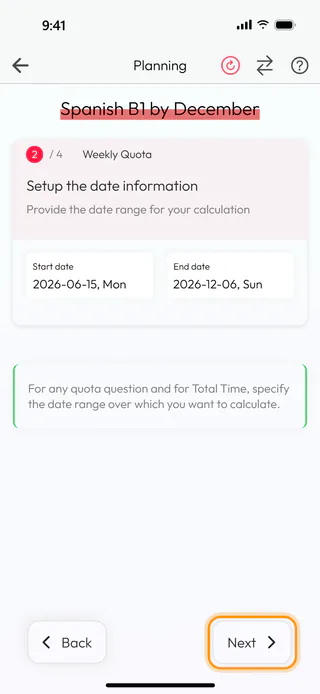
The second step asks for the stretch you have. Tap Start date, turn the wheels to today, June 15, 2026, and tap Confirm, then set End date to the day of the exam, December 6, 2026, the same way. If the work starts today, Start date can also stay empty, since the count then begins from now. Tap Next.
Say how many hours it takes
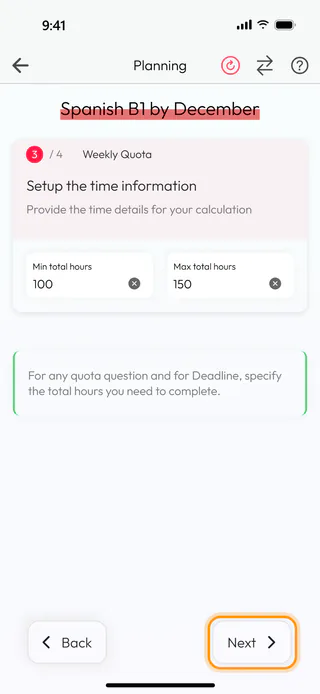
The third step asks how many hours the goal takes in all. Type 100 into Min total hours and 150 into Max total hours, the least and the most you expect it to need. When you have only one figure in mind, the minimum can stay empty, and the result then has a single number. Tap Next.
See what each week asks
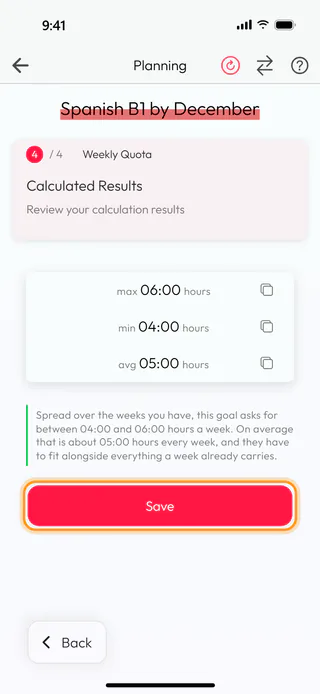
The last step shows what the goal asks of every week. For Spanish B1 by December that is max 06:00 hours, min 04:00 hours and avg 05:00 hours, and the sentence under the numbers spells out what that means for an ordinary week. The figures read like a clock, so 05:30 would be five and a half hours. When the dates are too close for the hours, a gray warning under the numbers says the quota comes out at more than a day, a week or a month can hold and suggests moving the deadline further out. The button with two arrows at the top turns the steps into a single page, the same way it does in Leftover.
Tap Save under the result. The Name window asks once more with the name already in it, and Save there keeps the calculation. The app says "Calculation saved successfully" and takes you back to Planning calculations, where the goal reads 04:00 min / 06:00 max hours weekly quota.
Planning also opens from a goal in Topic Manager. Calculate weekly need under the quota of a topic, or Calculate daily need and Calculate monthly need for the other periods, brings it up in a window with Quota and the period already chosen, with no name and no Save. The number it gives goes into the goal when you type it there yourself, as Set a goal for a topic shows.
What's next
Once the number is clear, Set a goal for a topic shows how to give it to a topic in the diary, and See how a topic adds up shows whether the weeks keep up with it. The planning calculator questions under From Calculators on the Questions screen are there for when the plan raises questions of its own, and Reflect on a question shows how a deck works.

