 Wastime
Reflect on a question
There are no right answers in these decks and nothing you have to finish. Often it is enough to find one question that catches you, copy it and take it wherever you think best, and the rest can wait for another day.
Before you start
Nothing needs to be set up first. The questions come with the app, so they open without an account or a network.
Steps
Open a deck
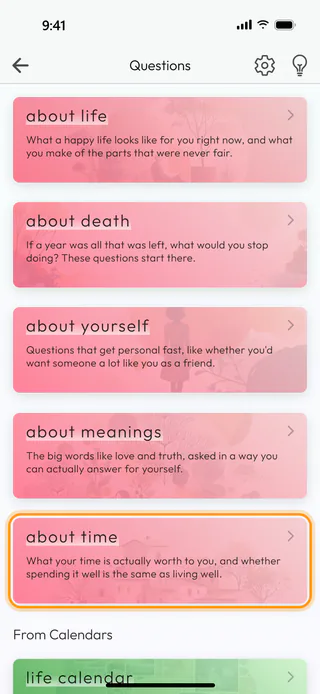
On the home screen, tap Questions. The first five cards are the main decks, about life, about death, about yourself, about meanings and about time. Below them, under From Calendars, From Topic Manager and From Calculators, are the decks that other parts of the app open as well. Tap about time.
Move through the questions
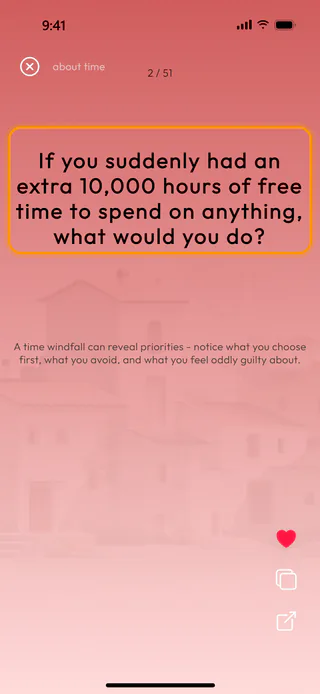
The deck opens over the whole screen with its first question. Swipe up for the next one and down to go back. The counter at the top shows where you are, here 2 of 51, and the name of the deck sits next to the round cross at the top left. Under each question there is a short line about what it is really asking.

Copy the question
When a question catches you, tap it, or tap the copy button, the middle one of the three round buttons at the bottom right. The app says "copied" and puts the question itself on the clipboard, without the line under it, so you can paste it into your notes or a journal and answer there in your own words.

Mark it with a heart
To keep a question you want to come back to, tap the heart at the top of the same column, and it fills in. A second tap takes the mark off again. The heart stays on your device and shows whenever you reach this question again, though the app has no separate list of the questions you marked.

Pick up where you left off
Tap the round cross at the top left to close the deck. The next time you open about time, it starts on the same question with its heart still in place, and every deck keeps its own place this way.
What's next
If thinking out loud comes easier than writing, a question can go to an AI chat as a prompt that asks you one question at a time, and Talk a question through with AI shows how. The deck wasted topics under From Topic Manager sits well beside the questions that help decide whether an activity earns its hours, which Identify a wasted topic walks through. A few questions of the same kind wait under the card about your time away on Statistics, as See what passed while you were away shows. The Reflection Questions page tells more about the decks.

