 Wastime
Add a topic
A topic is one activity you want to keep an eye on, like the guitar you keep meaning to pick up again. A name is all it needs to begin with, and goals or the hours you put in before can be added later, once the first weeks show how it actually goes.
Before you start
Nothing needs to be set up first. A topic can also be created while you log time, by typing a new name into the topic field of Log time, as Log your time shows, and this guide shows the other way in, through Topic Manager.
Steps
Open the Meaningful side
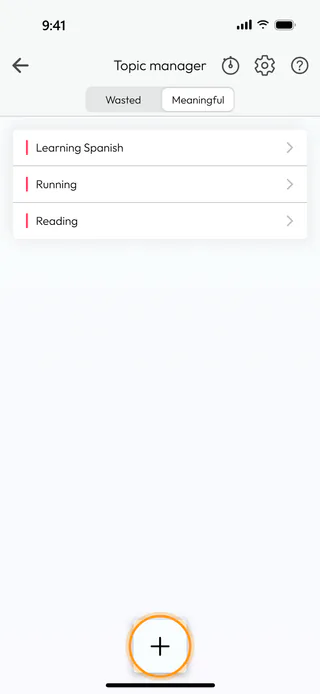
On the home screen, tap Topic Manager. The screen opens on Wasted, the side for time you would rather take back, so tap Meaningful to see the topics you want more of, then tap the round + button at the bottom. A wasted topic is added the same way from the Wasted side, where the form is called Create wasted topic.
Name the topic and save it
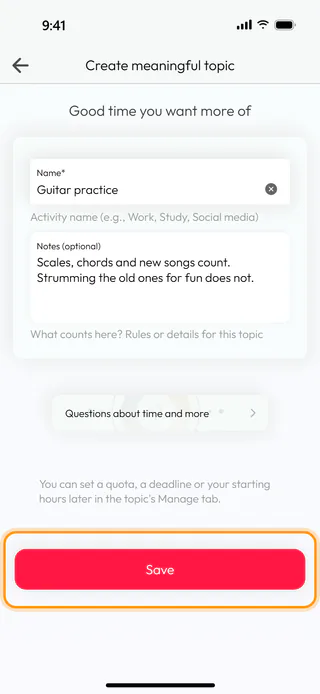
The form Create meaningful topic opens with the line "Good time you want more of". Type the name into Name*, here Guitar practice. Notes (optional) is the place to say what counts towards the topic and what does not, which saves you a doubt later when an hour could belong here or somewhere else. The card Questions about time and more opens the deck meaningful topics, a set of questions for thinking the topic through. Tap Save.
Find it in the list
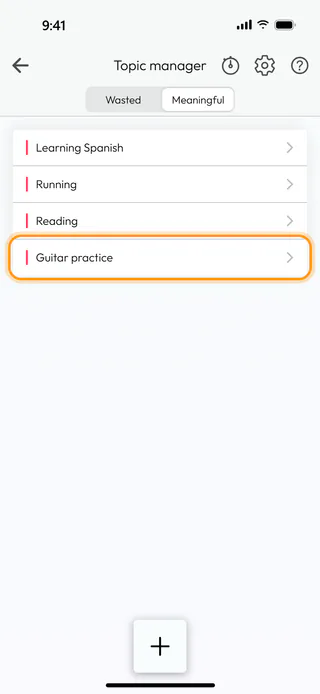
The app says "Topic created successfully." and takes you back to Topic manager, where the new topic sits at the end of the Meaningful list until you move it, as Reorder your topics shows. From now on it is among the topics you can pick when you log meaningful time, and it has a timer of its own. A quota, a deadline or the hours you spent on it before can be set later on the topic's Manage tab, whenever you feel the need.
What's next
Once a few entries are in, the topic shows what they add up to, as See how a topic adds up explains, and Set a goal for a topic gives it a quota to measure your weeks against. When you cannot tell which side an activity belongs on, Identify a wasted topic weighs it up with a few questions. The questions behind the card on the form work like any other deck, as Reflect on a question shows, and the Time Diary page tells more about keeping a diary of your hours.

