 Wastime
See what a routine adds up to
An hour a day hardly feels like anything until you multiply it by the years, and that is the one sum nobody does in their head. Basic does it for you from the time an activity takes and the stretch you want to run it across, whether it is a routine you would like to keep or one you are no longer so sure about.
Before you start
Nothing has to be in place before Basic. It opens with the same name window as Leftover, and Count the time left with someone shows how that window works.
Steps
Set the time it takes
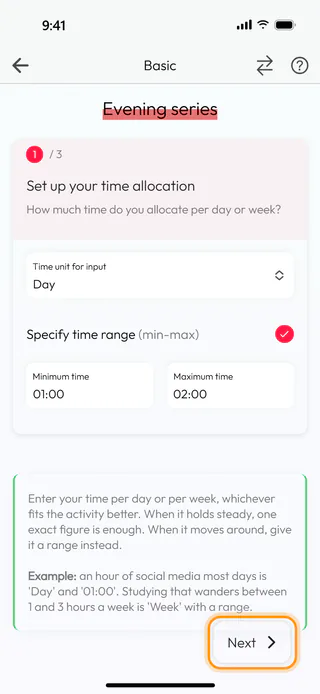
On the home screen, tap Calculators, then Basic, and start a new calculation with the round + button at the bottom of Basic calculations, naming it Evening series or anything else you will recognize. The first of three steps asks how much time the activity takes. Time unit for input is already on Day, which suits something you do in the evenings, while Week takes a plain number of hours for an activity that comes and goes over the week. An evening of a series runs an hour or two, so tick Specify time range, and a Minimum time field appears in front of Maximum time. Tap each of them, turn the wheels to 01:00 and to 02:00 and tap Confirm. Without the range there is a single Exact time, for an activity that always takes the same. Tap Next.
Choose how long it runs
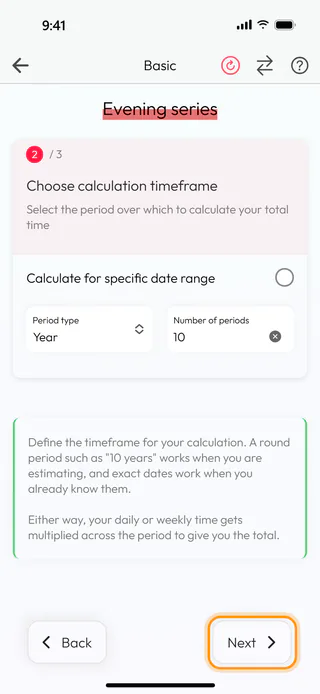
The second step asks how long to run it for. Period type starts on Year, with Week and Month in the same list, so type 10 into Number of periods for ten years. When you know the exact dates instead, Calculate for specific date range swaps both fields for Start date and End date, and either of them can lie years ahead. Tap Next.
See the total
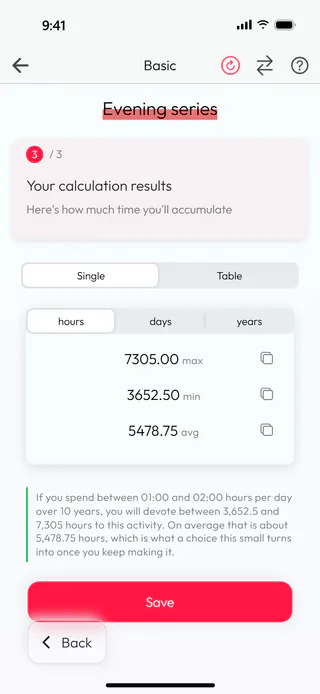
The last step shows what the routine comes to. For Evening series that is 7305.00 hours at most, 3652.50 at least and 5478.75 on average, and the sentence under the numbers says it in words for the whole 10 years. Switch to days and the most comes to a little over 300 of them, while years and Table show the same in years and side by side. The button with two arrows at the top turns the steps into a single page, the same way it does in Leftover.
Save it
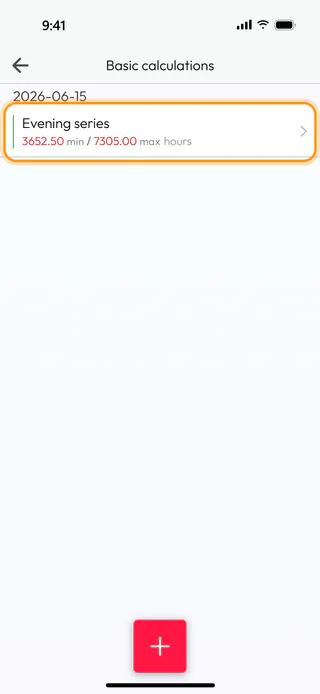
Tap Save at the bottom of the last step. The Name window asks once more with Evening series already in it, and Save there keeps the calculation. The app says "Calculation saved successfully" and takes you back to Basic calculations, where Evening series now sits under today's date with 3652.50 min / 7305.00 max hours.
The same calculator also opens from a topic in Topic Manager. Sum up starting hours on the topic's Manage tab brings it up in a window of its own, with no name and no Save, and the figure it gives goes into Starting hours when you type it there yourself, as Add hours you spent before shows.
What's next
When the activity is one you log in the diary, Add hours you spent before puts the hours from before your first entry into its topic, and Log your time keeps the count going from today. For a habit you would rather look back on and weigh, Add up what a habit has taken does the sums over a stretch of the past in Wasted. And if the total makes you wonder whether the routine still earns its place, the basic calculator questions wait under From Calculators on the Questions screen, and Reflect on a question shows how a deck works.

