 Wastime
Find the peaks in your logged hours
A total for the month hides how different the days inside it were, a quiet one right next to one that went entirely to a series. The blocks of best and worst stretches on the Time tab find those edges, and dates of your own let you look at any piece of the diary, a holiday, say, or the weeks after a change you made.
Before you start
Look back on your logged hours shows how to open the Time tab and choose a period.
Steps
Open the best results
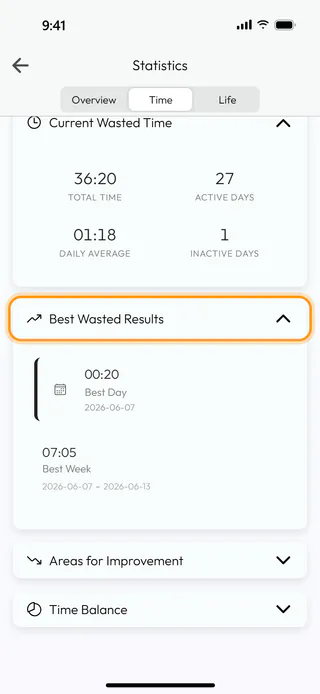
Choose All, the whole diary from the first entry to the last, and tap Best Wasted Results. On the wasted side the best day is the one with the least wasted time, 00:20 on 7 June in the example, and Best Week sits under it. A week shows up once the period runs longer than two weeks, a month once it runs longer than two months and a year once it runs longer than two years.
See where most of the time went
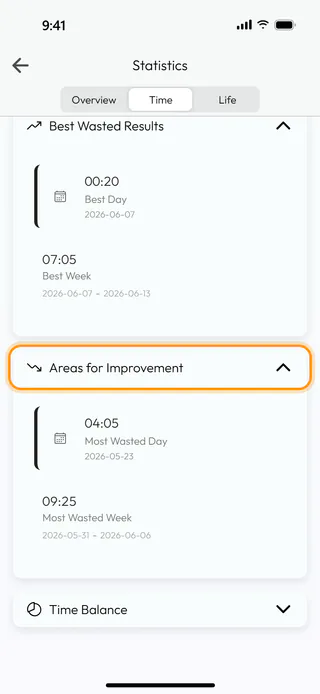
Tap Areas for Improvement for the other edge, the day and the week that took the most, here Most Wasted Day with 04:05 on 23 May. A week or a month that hasn't ended yet takes part on equal terms with the finished ones.
Turn to meaningful time
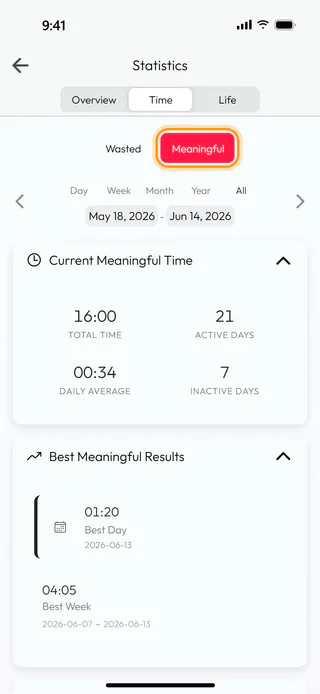
Switch to Meaningful, and both blocks are worked out again for that side. Here the best day is the one with the most time, 01:20 on 13 June, and the weakest stretches go by the names Lowest Day and Lowest Week.
Pick your own dates
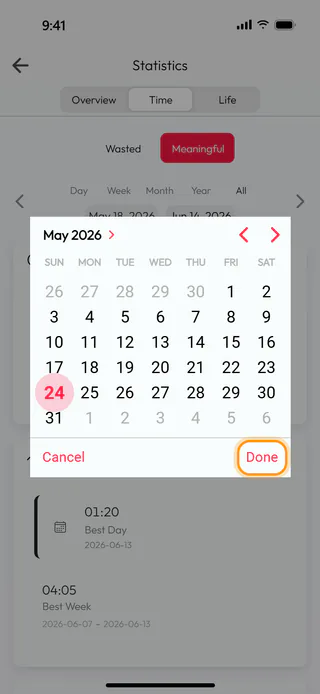
To look at a stretch of your own, tap the first date under the period buttons, pick a day in the calendar, 24 May in the example, and tap Done. The second date works the same way. The arrows then move the whole stretch by its own length, a start date set after the end date pulls the end date along with it, and a tap on any of the period buttons brings the usual periods back.
What's next
See how a topic adds up shows the same kind of numbers for one topic, and Sort and filter your entries brings up the entries behind a day that stood out.

