 Wastime
See how much of your year has passed
The calendar year is the same for everyone, while your own year begins on your birthday, and it is rarely clear how much of it is already behind you. Statistics shows that in weeks, days and percent, and one figure like that can sometimes say more about time than a whole calendar on the wall.
Before you start
Your year is counted from your birthday, so it has to be in the app first, and Set up your life calendar or Estimate your life expectancy puts it there.
Steps
Open Statistics
On the home screen, tap Statistics. It opens on Overview, the first of its three tabs, with Time and Life beside it.
Read your current year
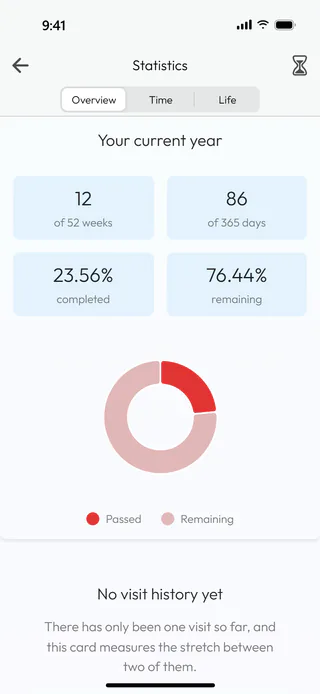
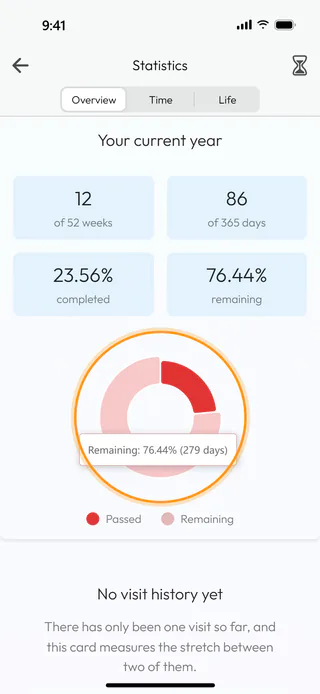
Your current year starts on your last birthday and runs to the next one, so the first of January plays no part in it. For a birthday on 21 March, by 15 June 12 of 52 weeks and 86 of 365 days are behind you, which comes to 23.56% completed and 76.44% remaining. Touch a part of the ring under the figures, and it tells how many days it stands for, such as "Remaining: 76.44% (279 days)".
Pull the life timer down
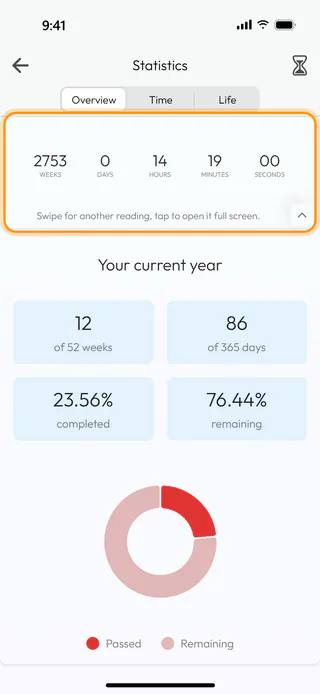
At the very top of Overview, pull the list down and keep pulling, and the life timer slides out above your year, counting down the time you have left to the second. Swipe it sideways for another reading, tap it to open it full screen, and the small arrow in its corner folds it away again. The button with an hourglass at the top right opens the same timer, and both are there once your life calendar is set up. If you would rather not see the timer at all, switch off Life timer under Account and then Settings in the menu.
What's next
Under your year, Statistics also counts the time between your visits to the app, as See what passed while you were away shows, and Watch the life timer tells more about the timer and its readings.

