 Wastime
Start from a worked example
An empty calculator is hard to begin with, and it is not always clear which number belongs in which field. Every calculator has a helper with worked examples, so you can load one, see how its numbers fit together, and then start your own from the same shape.
Before you start
Nothing has to be in place first. This guide uses Basic, and See what a routine adds up to shows the same calculator with figures of your own. The helper of Leftover appears once your own life expectancy is set, as Count the time left with someone explains.
Steps
Open the helper
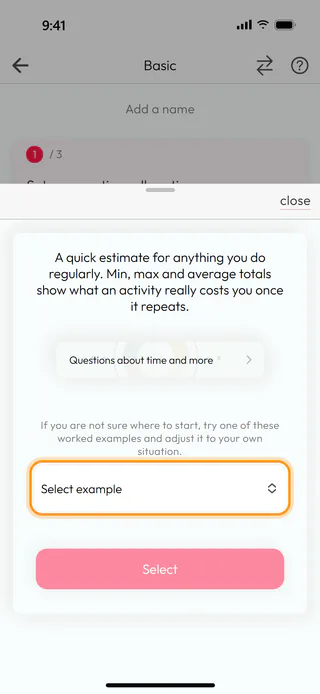
On the home screen, tap Calculators, then Basic, and start a new calculation with the round + button. This time Skip in the name window is enough, because the example brings a name of its own. Tap the question mark at the top right, and the helper slides up. It starts with a line about the calculator and a Questions about time and more card that opens the deck of this calculator, the way Reflect on a question shows, and under them it says "If you are not sure where to start, try one of these worked examples and adjust it to your own situation." Tap Select example.
Pick an example
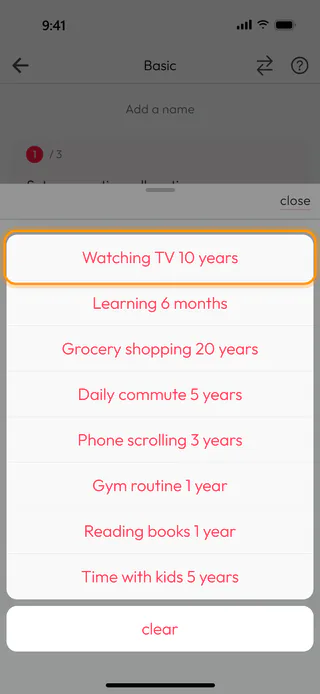
The examples open as a list from the bottom, eight of them for Basic, from Watching TV 10 years to Time with kids 5 years. Choose Watching TV 10 years, then tap Select, which turns active once an example is chosen. The helper closes, and the calculator fills in.
Look it over
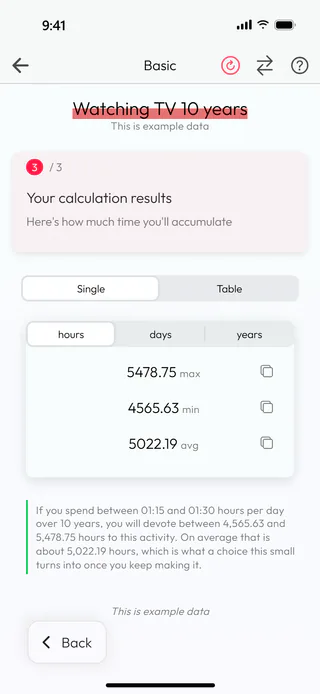
The name of the example sits at the top with "This is example data" under it, and every field holds what the example entered, an hour and a quarter to an hour and a half of television a day for 10 years. Tap Next twice to reach the result, 5478.75 hours at most, 4565.63 at least and 5022.19 on average, with the sentence under the numbers saying it in words. Any field of the example can be changed to see the total move, though an example cannot be saved, and "This is example data" stands where Save would be.
Start your own
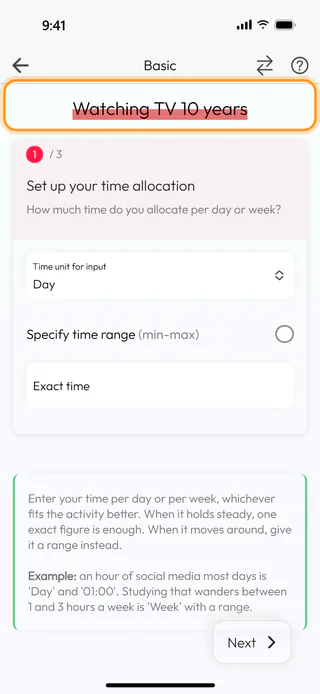
When you have seen enough, tap the red round arrow at the top, which clears the fields and takes the example mark away, so the steps are ready for figures of your own. The name of the example stays at the top, and a tap on it lets you give the calculation a name of its own before you save. Once your own numbers are in, Save waits on the last step as usual.
What's next
See what a routine adds up to walks through Basic with figures of your own, and Lay out your day in 24 hours does the same for a whole day, where the examples of the helper bring a day already laid out in blocks. When a number raises a question it cannot answer by itself, the deck behind Questions about time and more is a good place to stay with it for a while.

