 Wastime
Choose the default life expectancy
The app can know three numbers for your life expectancy, your own, the average of your countries and a saved result of the calculator. One of them is the default, and the Converter, Leftover and Statistics count from it, while the calendars keep a choice of their own.
Before you start
An option can be chosen once there is something for it to count from, at least one country for Countries, your own number for Custom and at least one saved result for Calculator. Set up your life calendar, Count from your country's average and Estimate your life expectancy cover each of them.
Steps
Open the settings
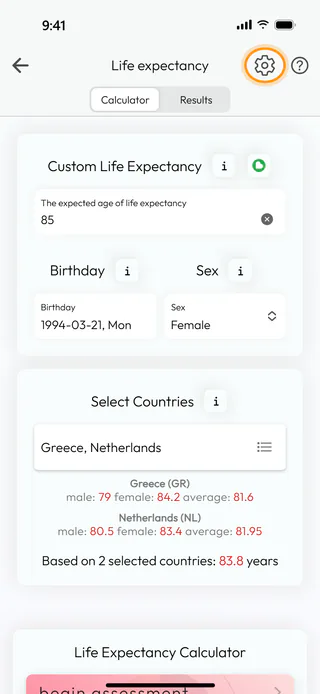
On the home screen, tap Life Expectancy, then the gear at the top right. When the gear is red, a source has appeared that the settings haven't shown you yet, and it turns back once you open them.
Pick the source
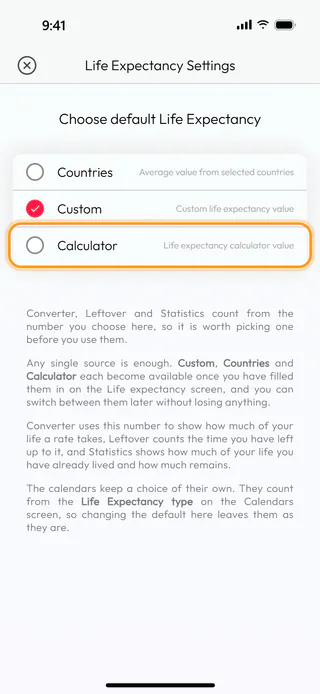
The Life Expectancy Settings window lists the three sources under "Choose default Life Expectancy", Countries for the average of your countries, Custom for your own number and Calculator for the result of the calculator. An option with nothing to count from yet is gray. Tap Calculator, and the window saves your choice and closes, with no button to press.
Know where it's used
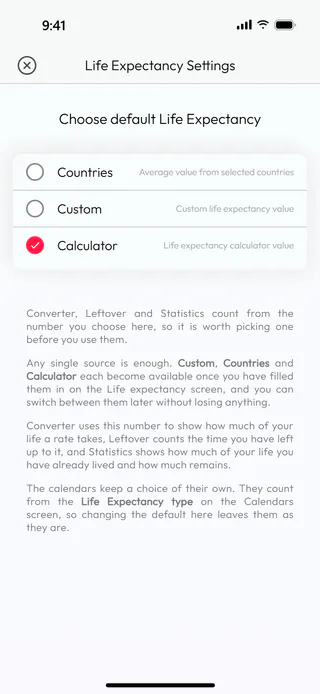
Open the window again to see the tick on Calculator. The Converter now counts from this number to show how much of your life a rate takes, Leftover counts the time you have left up to it, and Statistics shows how much of your life you have lived, which See your life in numbers walks through. Calculator takes the result marked "default" in Results. The calendars and the life timer stay on their own Life Expectancy type, on the Calendars screen, where the same source is called Calculations.
What's next
To have the calendars count from your countries, Count from your country's average walks through the choice on the Calendars screen. Review and update a result shows how to change which result is the default.

