 Wastime
Change or delete a topic
Topics change along with the weeks they describe, and an evening of series can turn into an evening of films long before the name in the app catches up. Renaming a topic touches nothing but the name, while the other three choices reach into the entries you have already logged, so before any of them the app asks you to type a short confirmation.
Before you start
You need a topic with a few entries behind it, so that there is something to change. Add a topic shows how to create one, and Log your time how to give it entries.
Steps
Rename a topic
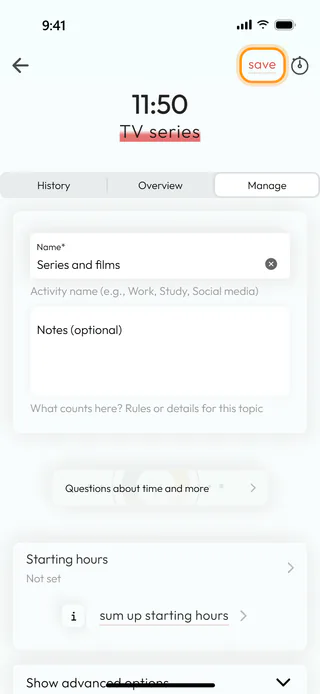
On the home screen, tap Topic Manager, open the topic, here TV series, and switch to Manage. Type the new name into Name*, here Series and films, which suits the movie night among its entries better, and if the topic now covers a little more than before, Notes (optional) is the place to say so. Save at the top turns red as soon as there is something to save. Tap it, and the app says "Changes saved". The new name shows everywhere at once, the past entries included, since all of them point to the same topic.
Open the advanced options
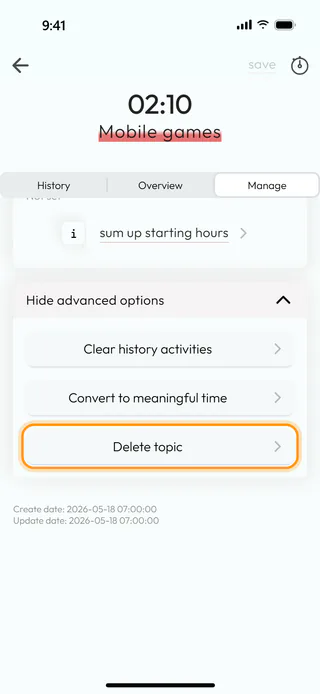
Go back to the list and open the topic you no longer need, here Mobile games, again on Manage. At the bottom of the tab, tap Show advanced options, and three rows appear. Clear history activities wipes every entry of the topic and leaves the topic in place with its name and goals, which helps when you want to start counting afresh. When a topic turns out to belong on the other side, Convert to meaningful time moves it there with all of its entries, and on a meaningful topic the same row offers Convert to wasted time. The last row, Delete topic, takes the topic away for good. Tap it.
Confirm the deletion
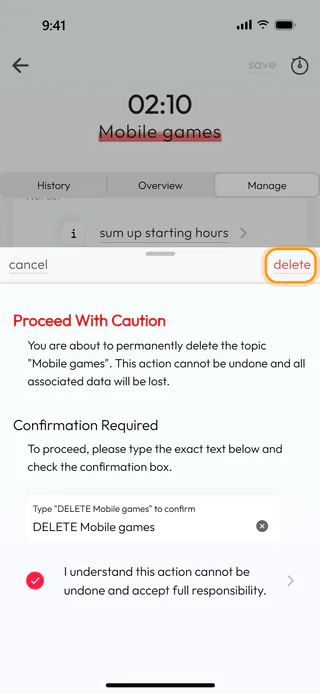
A sheet slides up with "Proceed With Caution" in red and a warning that everything logged in the topic will be lost. Type the text the field asks for exactly as it stands, here "DELETE Mobile games" with its capitals, and tick "I understand this action cannot be undone and accept full responsibility.". Only then does Delete at the top turn active, and Cancel at the top left closes the sheet with nothing changed. Converting and clearing ask for the same confirmation, with the bare name of the topic to type, and tell you afterwards that it worked. Tap Delete.
Check what is left
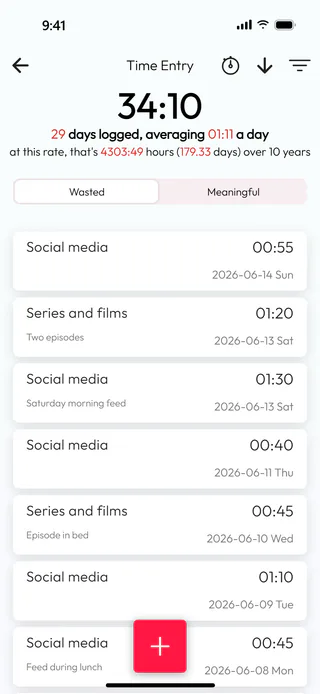
The app reports that the topic "Mobile games" was deleted and returns to Topic manager, where only Social media and Series and films are left on Wasted, and the entries of the deleted topic went along with it. Back on the home screen, Time Entry on Wasted now comes to 34:10 instead of 36:20, and the renamed topic shows as Series and films in its earlier entries. A deleted topic cannot be brought back from inside the app, only by restoring a backup made before the deletion.
What's next
A renamed topic keeps all of its numbers, and See how a topic adds up shows where to read them, while Set a goal for a topic covers the goals on the same Manage tab. When you cannot tell whether an activity belongs on the wasted side at all, Identify a wasted topic weighs it up with a few questions.

